 Kinetra
RungParse · PLC logic troubleshooting that works without internet
Why the output is off.
RungParse is a Windows desktop application for controls engineers and technicians. It works alongside Studio 5000 on the plant laptop. The engine finds the cause. The AI explains it. Optional read-only Live view of tag values from Logix (EtherNet/IP) and S7-1200/1500 controllers (S7 needs PUT/GET access on the PLC, which you control; limit it to what your site allows). Never writes to the PLC. Live is off by default and needs a valid license. It connects only when you turn on Live, to read values. With Live off, the app makes no network connection. RungParse and all its licenses are still coming early 2027.
What you open
Save an L5X from Studio 5000 with tag data, or open a TIA Portal project export. Open it with one Open button. RungParse tells the two apart. L5K import [To confirm against the next build]. The welcome screen also offers the three built-in practice projects. Until a file is open, the assistant has nothing to read.
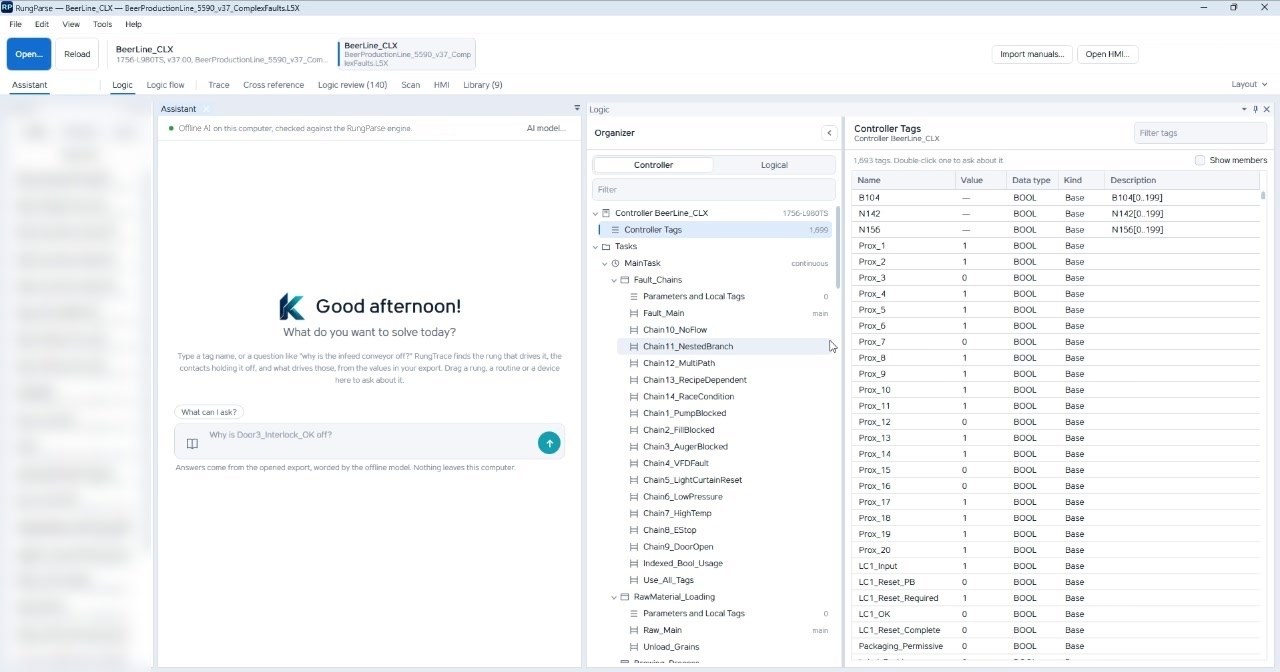
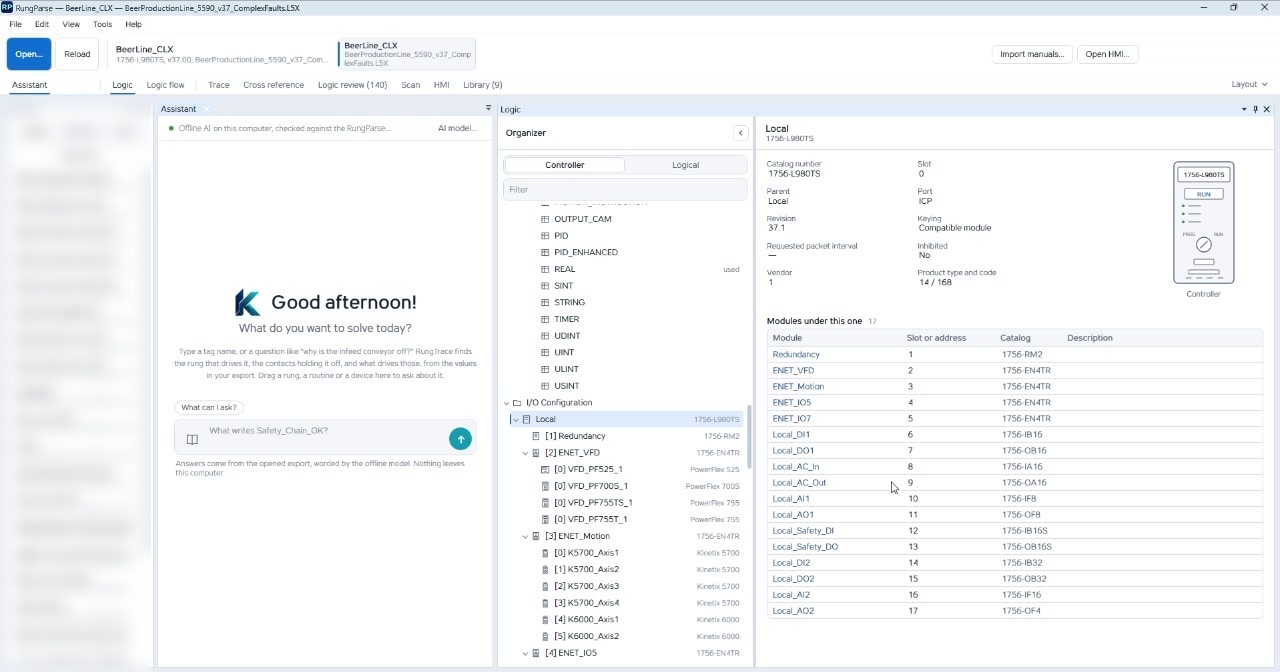
Studio 5000 L5X exports are read in ladder, ST, FBD, and SFC, through Logix v37. RungParsefollows the chain through programs, AOIs, structured text, function blocks, SFC actions, aliases, and I/O modules. BeerLine_CLX is a Studio 5000 export of a 1756-L980TS, revision 37. The controller tag table lists 1,693 tags. The organizer splits Controller and Logical. Controller shows the tag table, a routine shows its logic, and a module shows its configuration. Double-click a tag to ask about it, or show its members.
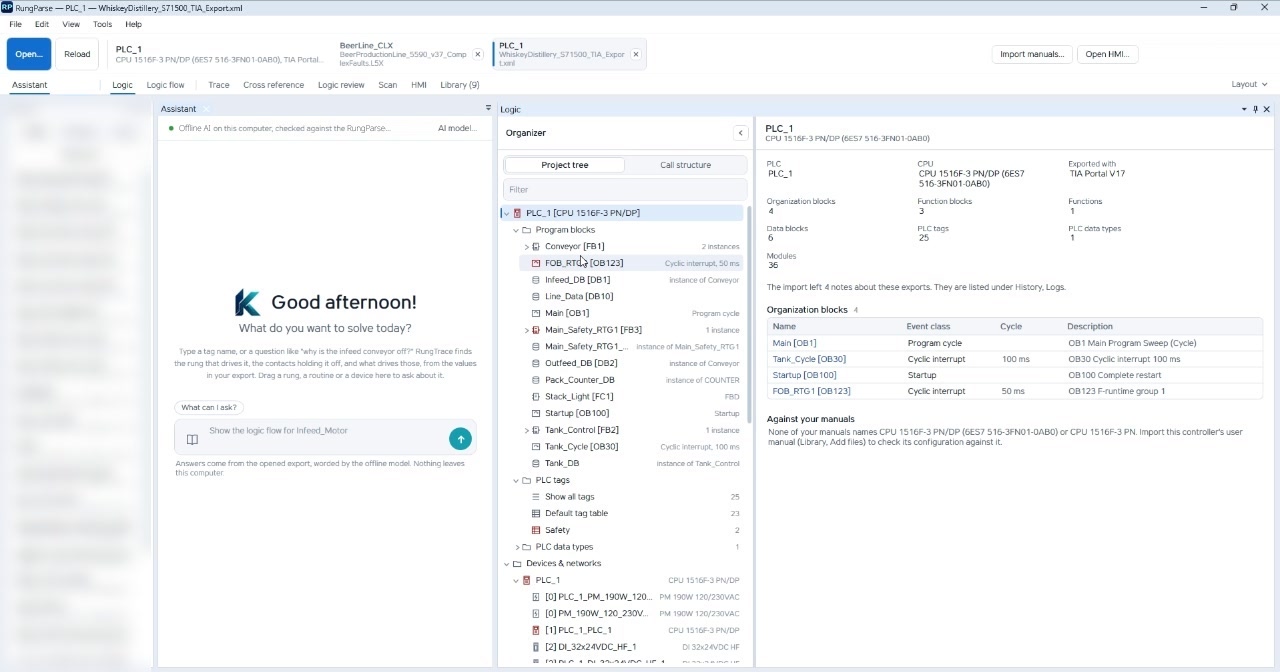
The same window opens a TIA Portal project export beside it, from an S7-1200, S7-1500, or ET 200SP CPU. PLC_1 is a CPU 1516F-3 PN/DP. LAD networks are drawn with the exported values, including calls. Function block and SCL appear as block types in the project tree. This page does not claim that every TIA language is drawn.
Ask with the thing in front of you
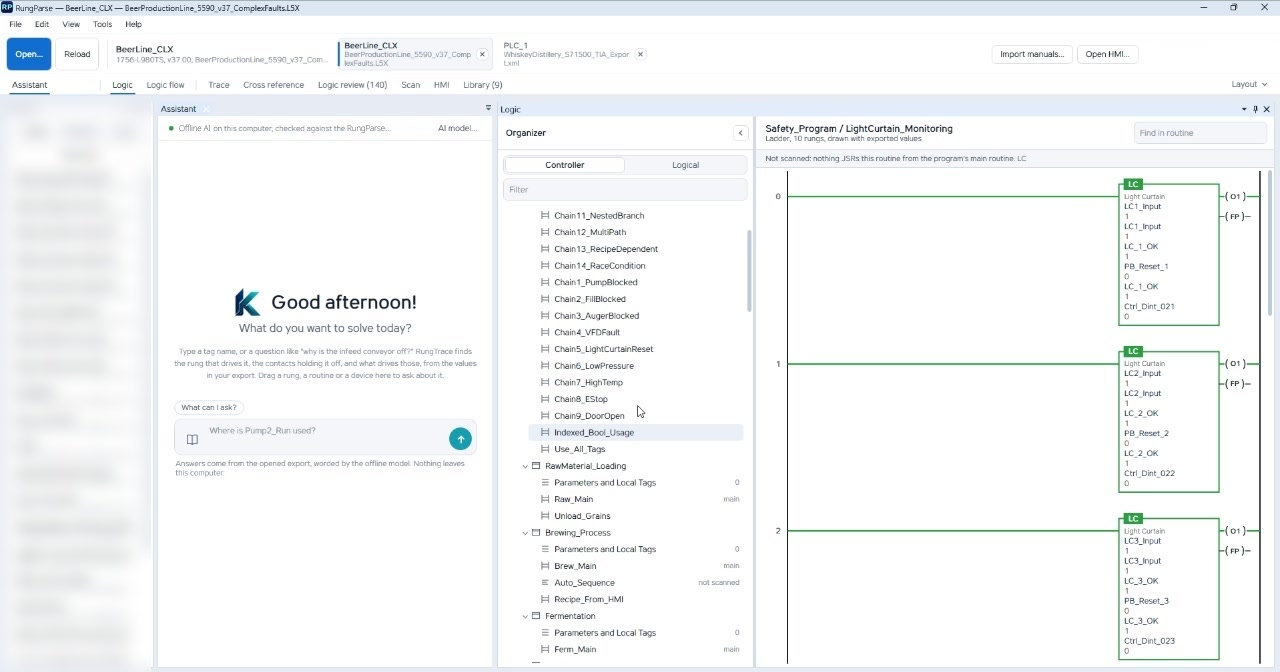
Type a question or a tag name, click any tag on a rung, or drag in a rung, routine, card, drive, or axis. A dragged item lands as a chip. You can also double-click a tag, or start from a suggestion chip. The answer shows the verdict, the blocking contacts, every root cause, latches with what resets them, and the rungs that are ruled out. The composer in the tour reads: ask about a tag, a rung, a fault, or a device.
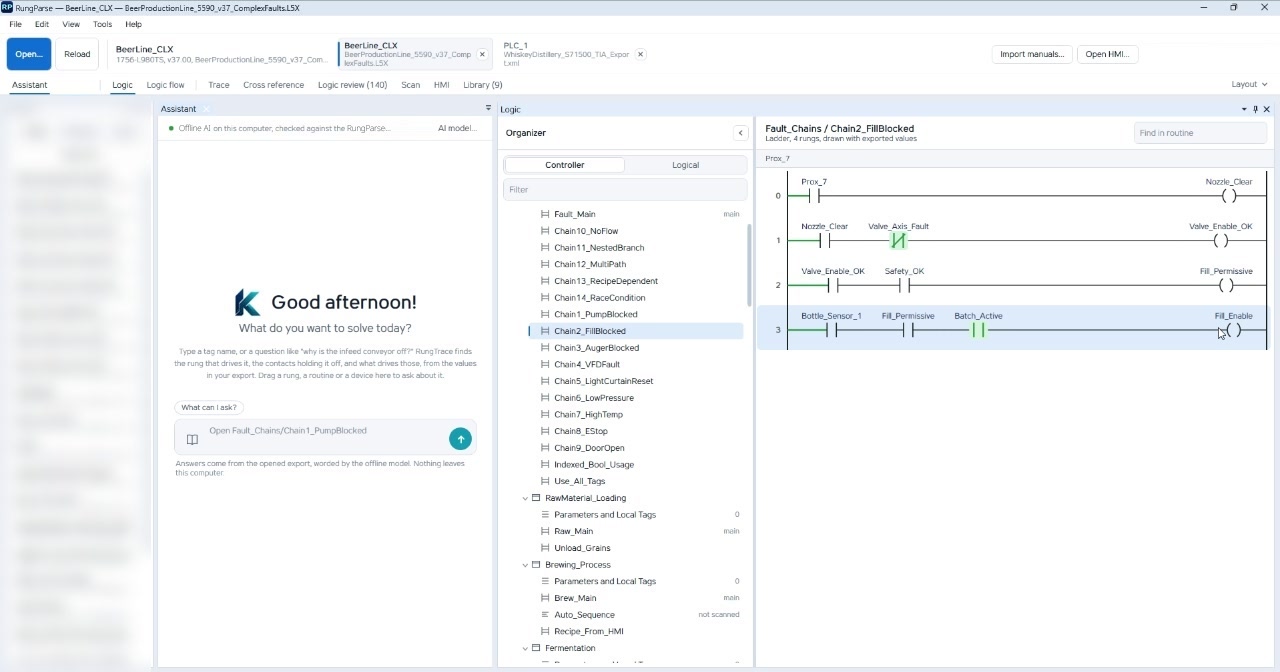
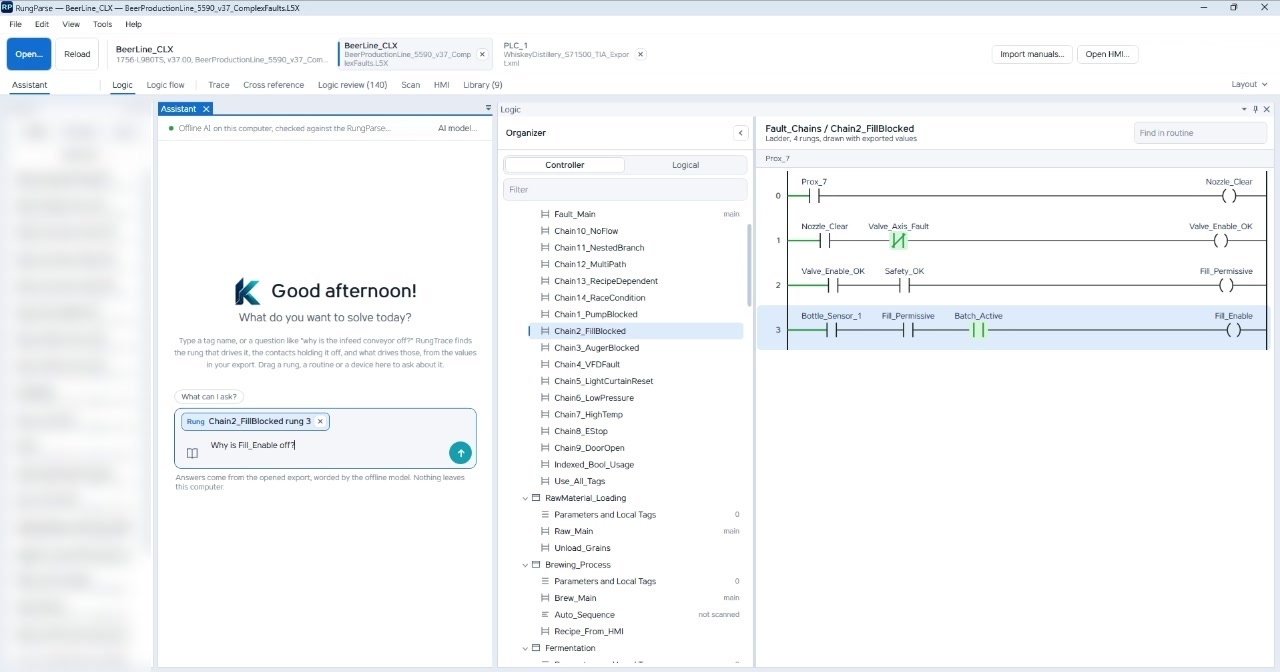
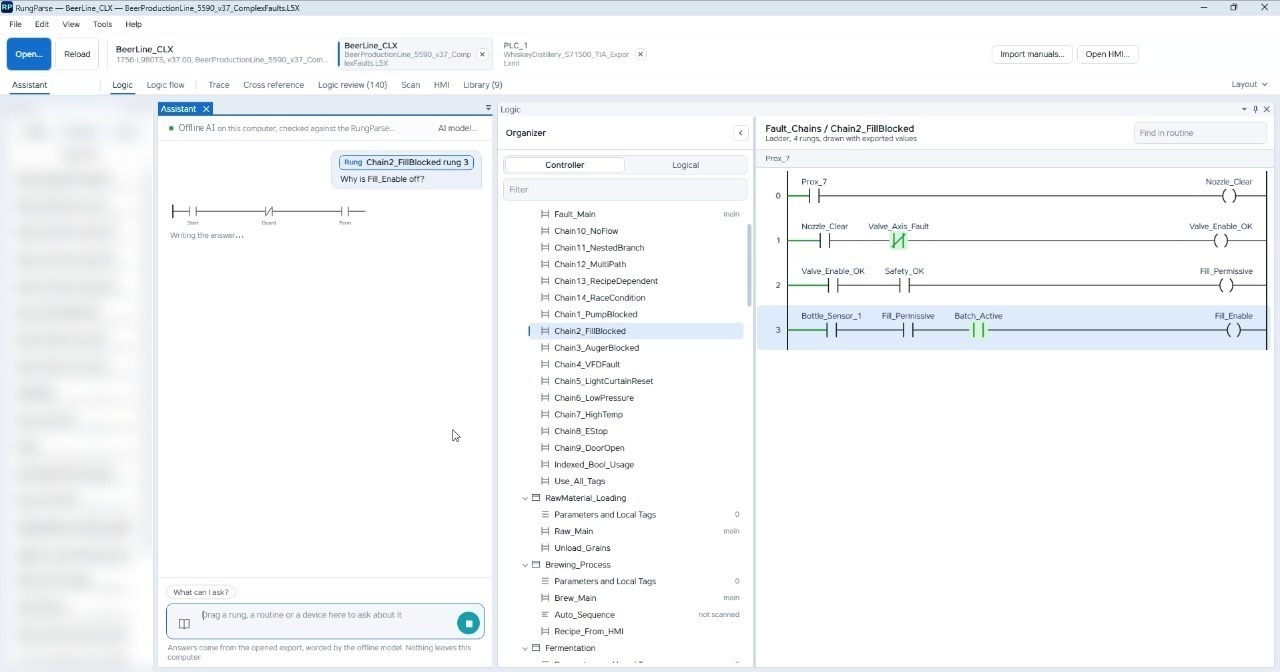
On BeerLine, LightCurtain_Monitoring is open and marked “Not scanned: nothing JSRs this routine.” Chain2_FillBlocked is the routine that owns the coil in question. It is four rungs, drawn with the exported values. On rung 3, Bottle_Sensor_1 and Fill_Permissive are open. Batch_Active is true. Fill_Enable stays off.
The rung lands as “Rung Chain2_FillBlocked rung 3.” The typed question is “Why is Fill_Enable off?” Send does not leave the computer.
The engine finds the cause. The AI explains it.
Every fact comes from RungParse's own engine. AI that runs on the laptop and works without internet turns those findings into plain-English troubleshooting steps. Each answer is checked against the trace. If the model names a tag the trace does not show, RungParse shows its own answer instead.
On launch the status line says the AI is loading, and that the RungParse engine answers until it is ready. When the model is up, the line turns green: AI on this computer, working without internet, checked against the RungParse engine.
Answers come from the opened export, worded by the AI that runs on the laptop and works without internet. Nothing leaves this computer. While the AI is writing, the assistant shows a small ladder labeled Start, Guard, and Perm, and the caption “Writing the answer…”.
The engine can also stop and answer on its own. One pass on Fill_Enable ends “Stopped. This isRungParse's own answer.” It says Fill_Enable is holding its value (HOLD), holding at 0, and that set and unlatch are both false. It names competing writers, including Chain2_FillBlocked rung 3, and links to the rungs, cross reference, and the logic flow. A later pass is marked as worded by the built-in AI from RungParse's findings. Check the rung before acting.
Logic flow
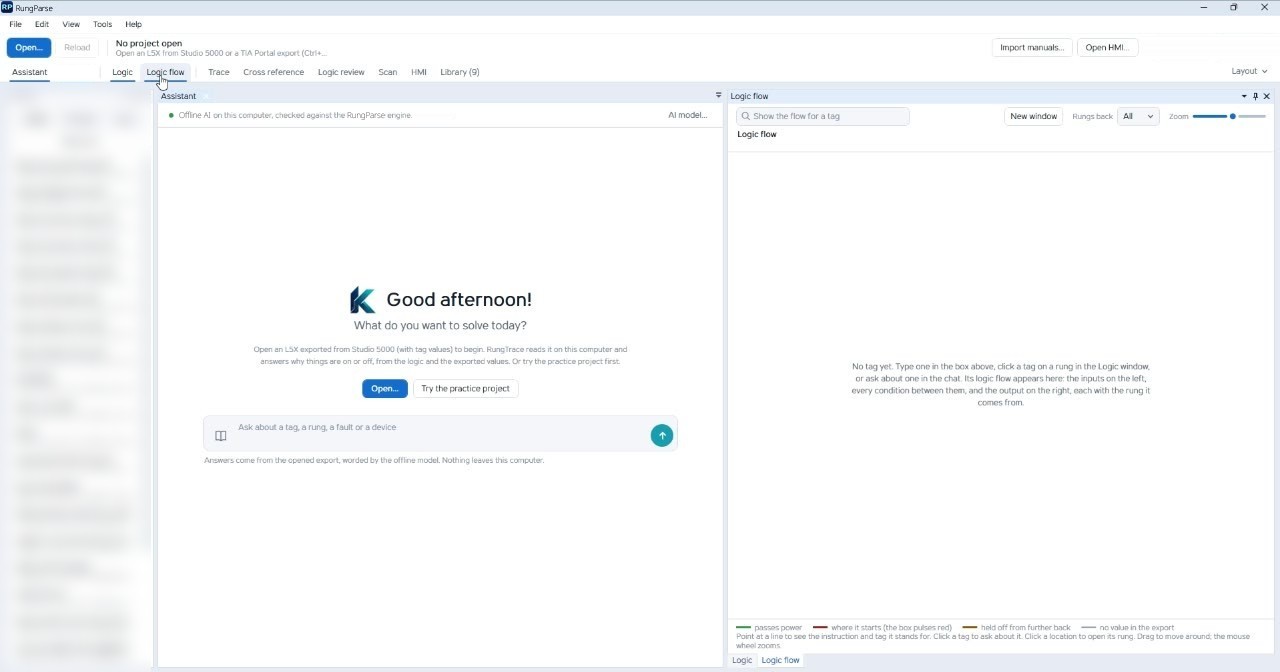
The Logic flow tab opens the page. Before a tag is chosen it says: “No tag yet. Type one in the box above, click a tag on a rung in the Logic window, or ask about one in the chat. Its logic flow appears here: the inputs on the left, every condition between them, and the output on the right, each with the rung it comes from.”
The box reads “Show the flow for a tag.” New window, Rungs back, All, and Zoom sit on that pane. The legend is passes power, where it starts (the box pulses red), held off from further back, and no value in the export. Point at a line to see the instruction and the tag. Click a tag to ask about it. Click a location to open its rung. Drag to move. The mouse wheel zooms.
For Fill_Enable the page counts 11 inputs, 39 conditions between them, 26 separate writers, and 39 lines holding something off. The output is written in 222 places. Bottle_Sensor_1 reads on Chain2_FillBlocked rung 3. Nothing in the logic writes it. It comes from outside the controller program. An OTE of MultiPath_OK on Chain12_MultiPath rung 2 is false, so that rung turns MultiPath_OK off. An OTE of Safety_OK on Chain1_PumpBlocked rung 2 writes it and decides. It is written in 13 places, and the last write in the scan decides. The page can also list writes that never run.
The same page works on a TIA Portal project export. Logic flow for Infeed_Motor counts 7 inputs, 25 conditions between, 4 separate writers, and 16 lines holding something off. The legend is the same.
Trace and cross reference
Trace puts the bit, the exported value, and the reason on one card. For Infeed_Motor it shows BOOL, off, why that network is not true, and the coil that writes the tag, with Show rung and Copy text. Cross reference lists use, instruction, operand, via, location, whether it is scanned, the rung, and a comment. Double-click a row to open that rung. It includes aliases and whole-structure uses, and shows which write decides the value.
Line-down answers: every stopped output is traced at once, with shared causes first.
Values come from the moment of export; re-export and press F5 to refresh. With the optional read-only Live view on (Live is off by default and needs a valid license), the logic, the logic flow, and the chat show live tag values. It connects only when you turn on Live, to read values. It never writes to the PLC. RungParse tells you an input is off, not whether the switch or its wiring failed.
The device, checked against your manuals [To confirm against the next build]
A module card shows catalog number, slot, parent, revision, keying, and a faceplate. Import manuals adds your own PDF manuals and EDS device files to the library on this computer. Answers quote your manuals, and device settings are checked against them. Check against the manuals cites the publication and the page for a setting, and says when no EDS file for that module is in the library. [To confirm against the next build]
On K5700_Axis2, a Kinetix 5700, the revision row cites Rockwell Automation publication 2198-UM002. The card says there is no EDS file for that module in the library. The same note appears on a 1756-RM2 and on Flex I/O cards in this export. The library does not invent a manual you have not imported. [To confirm against the next build]
A TIA Portal project export, in the same window
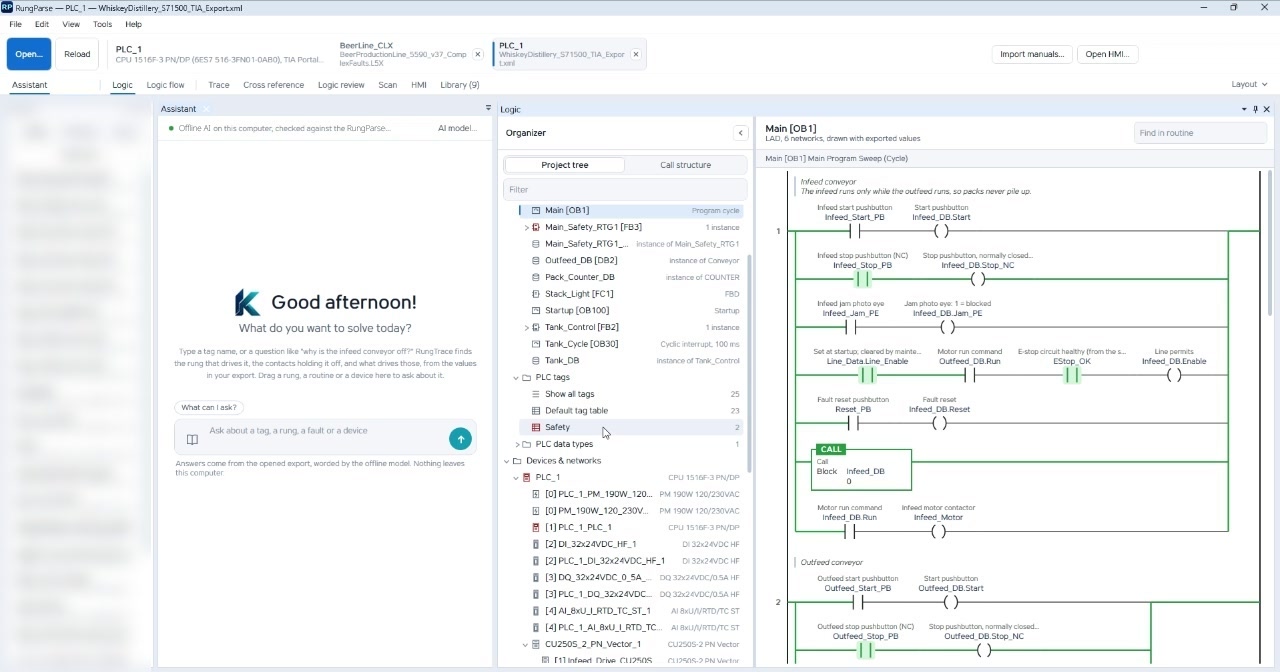
Open accepts a Studio 5000 L5X or a TIA Portal project export (L5K import [To confirm against the next build]). While the project export is read, the window stays on the Logix project. PLC_1 then opens as its own tab. BeerLine_CLX stays open. Chat history stays with the assistant.
The organizer is a project tree and a call structure. Main [OB1] is LAD, drawn with exported values: infeed and outfeed conveyors, a jam photo eye, and a call to Infeed_DB. Conveyor [FB1], instance Infeed_DB, draws the jam timer as a TON. Global data, the default tag table, devices, and the CPU card are in the same tree. FBD and SCL are listed as block types. They are not shown here as drawn networks.
Siemens support covers TIA Portal project exports for S7-1200, S7-1500, and ET 200SP CPUs, traced the same way as an L5X.
Review draws. Scan writes a new file.
Logic review keeps a count on the tab. In this pass the count is 140. One pattern is a coil with no contact: Startup rung 12, where Line_Data.Line_Enable writes every scan. Another is two coils on one bit. Ctrl_Bool_014 is an OTE in Indexed_Bool_Usage rung 13 and again later in Use_All_Tags. The suggestion is a drawing of one coil instead of two. The footer says the suggestions are drawings, not edits. Nothing there changes the project. Make the change in Studio 5000 and verify it before a download.
Scan lists routines long enough to split. In this file, Indexed_Bool_Usage is 200 rungs, Use_All_Tags is 300, and Bottle_Filling is 550. Saving the split writes a new L5X. The dialog says it does not touch the controller or the original file. The new file opens as its own project tab, BeerLine_CLX_split.L5X. The split does not go online with a PLC. Export L5K [To confirm against the next build]. Lists such as cross reference can CSV export [To confirm against the next build].
The toolbar is Open, Reload, Import manuals [To confirm against the next build], Open HMI [To confirm against the next build], and Export L5K [To confirm against the next build]. The tabs are Assistant, History, Logic, Logic flow, Trace, Cross reference, Logic review, Scan, HMI [To confirm against the next build], and Library [To confirm against the next build]. Open HMI reads FactoryTalk View Machine Edition exports for PanelView Plus [To confirm against the next build].
See the Logic. Know the Cause.
Not a download yet
RungParse is one install. A license covers Logix, TIA, or both — analysis features come with the platforms your key covers. Every RungParse license is targeted for early 2027. The screens on this page are a prototype session. They are not a release. Evaluate with the three built-in practice projects, which open without a key; prototype software is also available at your facility.
Brochure and user manual coming soon.